Dynamic vs Static Links: What Actually Changes?
Dynamic usually means a link whose destination you can change after publishing. Static means you cannot. Here is what that really costs, when each is right, and how to plan when all you have is static.
9 September 2026 · 9 min read · updated 10 October 2026
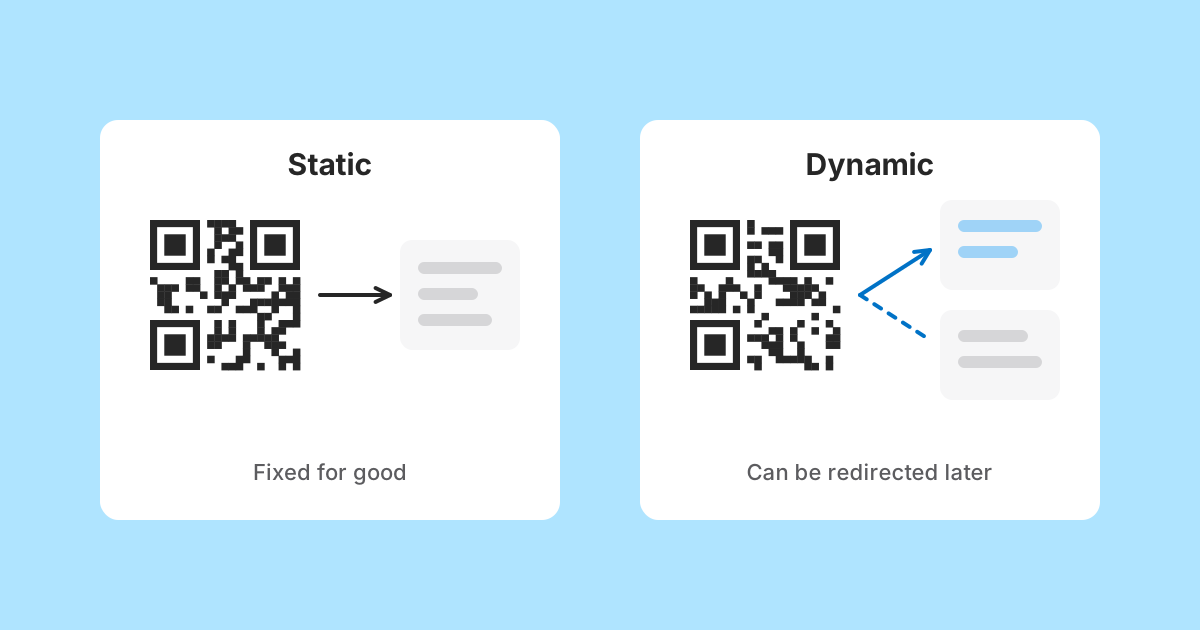
Dynamic is a word that does a lot of work in link tools, and it rarely arrives with a definition. Dynamic links, dynamic QR codes, dynamic pages: usually it describes a feature by what it lets you do rather than by what it is.
Underneath, the word almost always means one thing. Somewhere between the thing you published and the place it finally takes people, there is a record that can be changed after publication. Static means there is no such record, or that the record is fixed for good.
It is worth being precise here, because LinkMint is on the static side of that line. A short link made here, and a QR code made here, will always lead to the same place. This article explains what that means in practice, when it is exactly what you want, when it is not, and how to plan around it honestly.
Two definitions, stated plainly
A static link or code leads to a destination that cannot be changed after it is made. A plain URL printed on a poster is static. A QR code with a full web address encoded in its pattern is static. A short link whose target is fixed at creation is static too, even though a server looks it up each time.
A dynamic link or code leads to a destination that its owner can change later without reprinting or resending anything. The published artefact stays the same; the answer behind it moves. That always requires a service holding a record you can edit, and normally an account to prove the record is yours.
What static gives you
Static has a reputation as the cheap option. That undersells it. A fixed destination has properties that are genuinely valuable, and some of them are impossible to get any other way.
- Nobody can quietly change where it goes, including someone who takes over an account, because there is nothing to change.
- What a person checks today is what everyone will get tomorrow. On LinkMint, putting + in front of a code shows the destination before anyone visits it, and that answer stays true.
- A QR code with its content encoded directly needs no service at all. A Wi-Fi code or a contact card works on a phone with no signal.
- There is no account to lose, no subscription to lapse and no setting to get wrong later.
- It cannot be corrected. This is the cost, and it is the same property as the first point viewed from the other side.
The first and last points are the same fact. A destination that cannot be edited by a stranger cannot be edited by you either. Whether that is a strength or a weakness depends entirely on where the link ends up.
What dynamic gives you, and what it asks in return
A dynamic link lets you change your mind after publishing. The menu moved, the event was postponed, the page was rebuilt: you update one record and every copy in circulation follows. For anything printed in quantity, that is a real capability.
It comes with conditions that are easy to skim past.
- Somebody must keep control of the record. That usually means an account, a password and, for a business, someone who remembers which colleague set it up.
- The service must keep resolving it. If it closes, or the account lapses, every copy stops working at once.
- Anyone who gains access can redirect every printed copy somewhere else, which is a meaningful risk for a code on a payment notice or a parcel.
- Readers cannot rely on what they checked. A link that went to a reasonable page last week can go anywhere this week.
None of these makes dynamic a bad choice. They make it a choice with a dependency attached, and that dependency deserves the same thought as the benefit.
Where LinkMint sits
Being exact about this matters more than sounding generous, so here is the whole picture.
| Thing you make | Can its destination or content change later? | Notes |
|---|---|---|
| Short link | No | Fixed destination, never expires, code never reused, cannot be deleted by the creator |
| QR code | No | Content is encoded directly in the pattern and made in your browser |
| QR code of a short link | No | Still leads to the short link's fixed destination |
| Bio page at /@name | Yes, the page content | Edited only through the private edit link given when it was made |
So LinkMint has no dynamic links and no dynamic QR codes. What it does have is a page at a stable address whose content you can change, and that turns out to be a useful building block, which the planning section below comes back to.
The question that decides it
The useful question is not which kind is better. It is how expensive it would be to republish if the destination turned out to be wrong.
| Where the link is | Cost of fixing a wrong destination |
|---|---|
| Your own social profile | Trivial: paste a new link |
| A message you sent yesterday | Awkward: send a correction |
| An email newsletter already delivered | Impossible for that send |
| A table card in a café | A print run, usually small |
| Product packaging | A print run with weeks or months of lead time |
| A sticker on equipment in the field | A visit to every unit |
Near the top of that table, static costs you nothing: if the destination changes, you replace the link. Near the bottom, a static link to a page you do not control is a gamble that the page will still be right in a year, and over a long enough period that gamble tends to lose.
The good news is that you do not need a dynamic link to avoid the gamble. You need a static link to something you control.
Planning for change when your link is static
The idea is simple. If the link itself cannot move, make sure the place it points at can. Choose a destination whose address you will keep, and whose content you are able to change.
Option one: a page on your own website
If you run a website, give the printed material a page with a plain, permanent address, such as example.com/menu or example.com/events, rather than a file or a campaign page with a date in its name. Shorten that address if you want something tidier, and encode the result in the QR code.
When the menu changes, you change the page. The short link and the code never needed to know. This is the most durable arrangement available, because the address lives on a domain you control and survives any change of tools.
Option two: a LinkMint bio page
If you do not have a website, or do not want to touch it, a bio page does the same job. You make a page at /@yourname, and you receive a private edit link. The QR code or short link points at /@yourname, which never changes. What is on the page can change whenever you open the edit link.
Printed on the banner: a QR code of the bio page address /@riverside-bakes
Week one: the page lists this week's stalls, the order form link and opening hours
Week six: the stall moves pitch, so the page is edited to say where
Winter: the page is edited to point at the Christmas order form instead
The banner is never reprinted
This is genuinely editable behaviour, achieved honestly. The link is static; the page behind it is not. The trade is that every change is visible to everybody who ever saved the address, so editing a bio page is closer to editing a shop sign than to publishing a new post.
Option three: make the destination broad
Sometimes the right fix is simply aiming higher up a site. A code pointing at a shop's homepage will stay correct far longer than one pointing at this season's offer. You lose a little precision on day one and gain years of the code still making sense.
When static is simply the right answer
There are cases where an editable destination would add risk without adding anything useful.
- Wi-Fi codes and contact cards, which are data rather than destinations and should work with no connection at all.
- Links in published writing, references and documentation, where readers depend on the target not shifting under them.
- Payment, invoice and account pages, where a link that can be quietly repointed is a gift to anyone who gets into the account.
- Short-lived sharing, such as a link in a chat or a document circulated this week, where republishing costs nothing.
- Anything where people should be able to check the destination once and trust it.
When you genuinely need a dynamic tool
Being honest cuts both ways. There are situations where the planning above is not enough and a tool with editable destinations is the better fit.
- Large print runs where different codes must later lead to different, unrelated places, and you cannot put a page you control in between.
- Organisations that need several people to manage destinations under accounts, with an audit trail of who changed what.
- Cases where the destination must move between domains you do not control, such as a third-party booking system that changes over time.
LinkMint does not do any of that, and it is better to know before printing than after. If you go that way, ask the provider what happens to your codes if you stop paying, whether deleted codes can be claimed by someone else, and whether you can use your own domain so the codes survive a change of provider.
How each one fails
It helps to picture the failure before choosing, because the two kinds fail differently.
A static link fails when its destination disappears or goes stale. The visitor sees an error page from the destination site, or an out-of-date page. That is unhelpful but legible: something moved, and it is clearly not the visitor's fault.
A dynamic link has the same failure, plus two of its own. The service may be unavailable, which is usually temporary. Or control of the record may pass to someone else, through a lapsed account or a stolen password, and then a trusted printed code leads wherever that person chooses. That last case is the one worth designing against, and it is the main reason a fixed destination is a reasonable default for a free service with no accounts.
A short checklist before you publish
- Ask how expensive it would be to republish if the destination were wrong.
- If republishing is cheap, link straight to the destination and move on.
- If it is expensive, point the link at something you control: your own permanent page, or a bio page.
- If you use a bio page, store the edit link safely before printing anything.
- Use the + preview on any short link to confirm where it goes before it is printed or sent.
- Encode data such as Wi-Fi details or contact cards directly in the QR code, never via a link.
The short version
Static means the destination is fixed. It is predictable, needs nothing from you later, and cannot be hijacked, but it cannot be corrected either. Dynamic means the destination can be changed, which is useful for expensive print and comes with an account, a dependency and a new way to be redirected against your will.
LinkMint links and QR codes are static. The way to get the flexibility without the dependency is to point them at an address you control and can keep updating, whether that is a page on your own site or a bio page you edit with its private link.
Related reading
- Printed QR Codes: Point Them at Something You Control
A printed QR code cannot be changed, so the decisions that matter happen before it reaches the printer: where it leads, how big it is, and whether it actually scans.
- The Anatomy of a Useful Link-in-Bio Page
Top to bottom, what a good bio page contains, the four questions that decide whether anything belongs on it, and how to tell what is working without click counts.
- Short Links Are More Than Fewer Characters
Shortening is the least interesting thing a short link does. A good one is readable, hard to mistype, permanent, checkable before you tap it and quiet about who follows it. Here is what that is worth, and what it deliberately leaves out.