UTM Parameters Explained Without the Marketing Jargon
Five labels you can add to a URL so your analytics can say where a visit came from. What each one means, which three matter most, and the small inconsistencies that quietly split your reports.
25 March 2026 · 8 min read · updated 10 October 2026
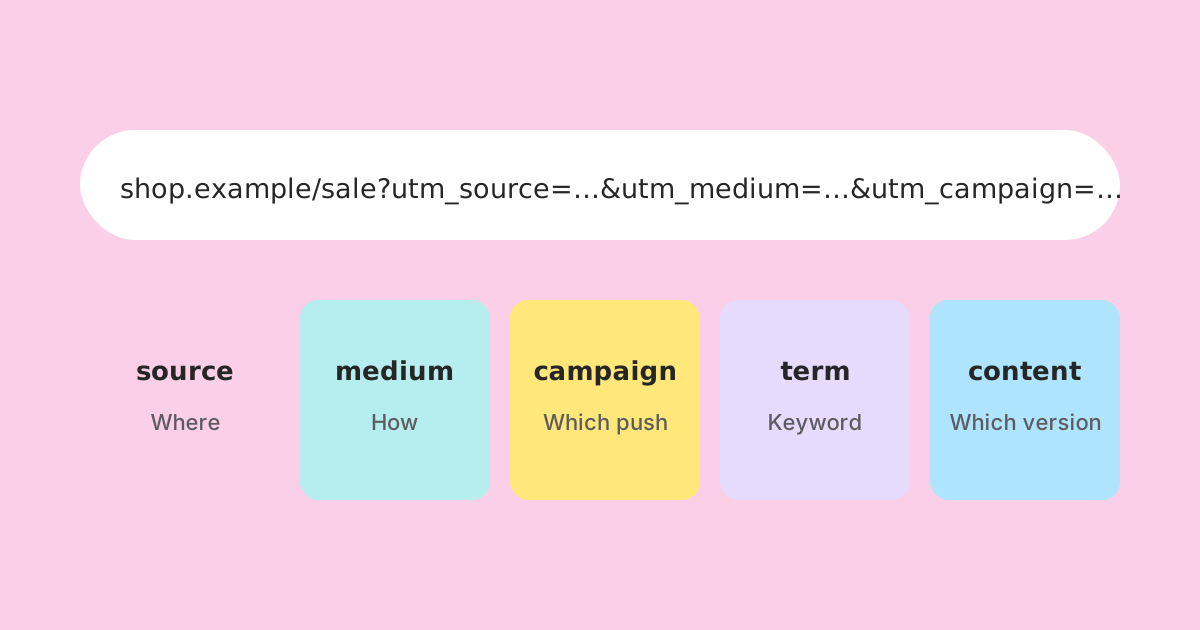
A UTM parameter is a label you add to the end of a URL so that the analytics on the destination site can tell where a visit came from. That is the whole idea. The name comes from Urchin Tracking Module, after Urchin, an analytics company Google bought in 2005. The name explains nothing, which is part of why the subject feels harder than it is.
https://example.com/spring-sale
https://example.com/spring-sale?utm_source=instagram&utm_medium=social&utm_campaign=spring-sale-2026
The page is the same page. The web server normally ignores the extra parameters, and the analytics script running on the page reads them when it records the visit. You have not changed where someone lands. You have attached a note explaining how they got there.
Two things follow from that. First, UTM tags only help if the destination site runs analytics that reads them, which most mainstream tools do. Second, the information lives in your analytics, not in the link. A link shortener, an email platform or a QR code just carries the tagged URL to the page; the counting happens at the other end.
The five parameters
There are five standard parameters. By convention, three of them (source, medium and campaign) should be on every tagged link, because most analytics tools need all three to file the visit properly in their campaign reports. The other two are optional and exist for finer detail.
| Parameter | Question it answers | Typical values | Use it |
|---|---|---|---|
| utm_source | Which site, sender or place? | instagram, newsletter, google, partner-blog | Always |
| utm_medium | What kind of channel? | social, email, cpc, referral, qr, print | Always |
| utm_campaign | Which push or promotion? | spring-sale-2026, product-launch | Always |
| utm_term | Which paid keyword? | running-shoes | Mostly for paid search |
| utm_content | Which version or placement? | header-button, footer-link, video-a | When one campaign has several links in one place |
utm_source: where it came from
The specific place the visitor was before they arrived. If you asked someone "where did you see this?", their answer is the source: instagram, the monthly newsletter, a partner's blog, a printed flyer. Keep it to one name per place and stick with it.
utm_medium: what kind of channel
The category, not the place. Source is instagram; medium is social. Source is newsletter; medium is email. The distinction feels fussy until you have six social sources and want to know whether social as a whole is earning its keep. Medium is what makes that question answerable.
Medium matters for another reason. Tools that group traffic into channels, such as Google Analytics 4 with its default channel groups, decide the channel mostly from source and medium using fixed rules. A medium of email lands in the Email channel. A medium of "newsletter-blast" may not match any rule and end up as unassigned. Before inventing a medium, check what your analytics tool expects. The common, safe values are email, social, cpc, display, affiliate, referral and organic, plus your own clear choices such as qr or print.
utm_campaign: which push
The name of the promotion, launch or piece of work the link belongs to. This is the value that lets you see one campaign's results across every channel at once. A good campaign name says what and when: spring-sale-2026 is far more useful in eighteen months than sale or promo.
utm_term: which keyword
Originally meant for the search keyword that triggered a paid ad. Ad platforms with auto-tagging often fill this in for you, so many people never set it by hand. You can borrow it for other detail, but if you do, write down what you used it for so everyone else does the same.
utm_content: which version
Tells apart links that share source, medium and campaign. An email with a button at the top and a text link at the bottom is the classic case: both are newsletter, email, spring-sale-2026, and utm_content (top-button versus footer-text) shows which one people actually used.
The mistake that splits every campaign in two
Many analytics tools treat UTM values as case-sensitive text. Google Analytics 4 is one of them. To those tools, Instagram, instagram and INSTAGRAM are three different sources, and your report shows three rows where you expected one. Nothing warns you. The numbers are all there, just divided, and the campaign looks smaller than it was.
Spelling causes the same split. e-mail and email, facebook and fb, spring_sale and spring-sale: each pair becomes two rows. The fix is boring and works every time: pick a written vocabulary and use only that.
- Use lower case for every value, always.
- Use hyphens between words, not spaces or underscores. Spaces get encoded as %20 or + depending on the tool, which makes values harder to read and compare.
- Keep a short list of allowed sources and mediums, and add to it deliberately rather than improvising.
- Put the year (and month if you run the same campaign often) in campaign names.
- Never abbreviate in one place and spell out in another.
A worked example: one campaign, five places
Say a small bakery is promoting a spring menu that runs through April 2026. The landing page is https://example.com/spring-menu. The campaign will appear in a newsletter, on Instagram, on a printed counter card with a QR code, in a partner café's blog post, and as two links in the same newsletter. Here is how the tags work out.
| Placement | utm_source | utm_medium | utm_campaign | utm_content |
|---|---|---|---|---|
| Newsletter, top button | newsletter | spring-menu-2026 | top-button | |
| Newsletter, footer link | newsletter | spring-menu-2026 | footer-link | |
| Instagram bio link | social | spring-menu-2026 | bio | |
| Counter card QR code | counter-card | qr | spring-menu-2026 | (none) |
| Partner café blog | corner-cafe-blog | referral | spring-menu-2026 | (none) |
https://example.com/spring-menu?utm_source=newsletter&utm_medium=email&utm_campaign=spring-menu-2026&utm_content=top-buttonIn the analytics afterwards, filtering by campaign spring-menu-2026 shows everything together. Grouping by medium compares email with social with print. Grouping by content inside the newsletter shows whether the top button or the footer link did the work. Every one of those questions was decided when the links were made, not when the report was opened.
Getting the URL itself right
A few mechanical details catch people out, and they are worth knowing even if a builder handles them for you.
- The first parameter follows a question mark; each later one follows an ampersand. If the URL already has a query string (for example ?id=42), the UTM parameters join it with & rather than starting a second ?.
- Anything after a # is a fragment, and it must come last. https://example.com/menu?utm_source=newsletter#cakes is right; putting the tags after the # hides them from the query string, and analytics will usually not see them.
- Characters such as &, = and # inside a value must be percent-encoded, or they break the URL apart. The simplest answer is not to use them in values at all.
- The order of the parameters does not matter to analytics.
What not to put in them
UTM values travel in the URL, which means they can appear in browser history, in server logs, in the address bar when someone screenshots the page, and in whatever the visitor copies and shares. Treat them as public.
- No personal data. Never put an email address, a name or a customer number in a tag. Most analytics tools forbid it in their terms, and it is a privacy problem regardless.
- No internal secrets, such as a partner's commission rate or an unreleased product name.
- No tags on links within your own site. A UTM-tagged link from your homepage to your shop page tells analytics the visit came from that tag, overwriting the real source the visitor arrived with.
UTM parameters and short links
A fully tagged URL is long and ugly. That barely matters behind a button in an email, but it matters a great deal on a printed card, in a QR code (longer content means a denser code) or in a social post where the URL is visible. This is where a short link earns its place.
The order is simple: tag first, shorten second. You build the full tagged URL, then create a short link whose destination is that whole URL. When someone follows the short link, the redirect sends them to the tagged URL, and the analytics on the page reads the tags as normal.
That only works if the shortener keeps the query string intact. LinkMint's shortener stores the destination's query string byte for byte, so the tags arrive exactly as you wrote them. The UTM builder at /utm-builder builds the tagged URL in your browser and can hand it to the shortener in one step. LinkMint itself records nothing when a short link is followed: no click counts, no cookies, no IP addresses. The measuring is done entirely by your own analytics on the destination page, which is where the UTM tags are read.
Where tagging stops working
UTM tags are reliable when the visitor clicks the exact link you made. They fall apart in a few predictable ways.
- People share the page, not your link. If someone copies a clean URL from the address bar, or the site strips the tags after loading, the next visitor arrives untagged.
- People type the address. A URL printed in full and typed by hand rarely keeps its tags, which is one more reason to put a short link or QR code on print.
- Consent and blocking. If a visitor declines analytics cookies or blocks the script, the visit may not be recorded at all, tagged or not. Treat totals as a lower bound, not a census.
- Auto-tagging conflicts. Some ad platforms add their own click identifiers. Check your tool's documentation before adding manual UTM tags to ads, because the two can disagree.
None of this makes tagging pointless. It means the numbers are best read as comparisons (email against social, this spring against last spring) rather than as an exact count of every person who saw the campaign.
A checklist before you send anything
- Source, medium and campaign are all present.
- Every value is lower case, hyphenated and spelled exactly as in your written vocabulary.
- The medium is one your analytics tool's channel rules recognise.
- utm_content is set wherever one placement has more than one link.
- Tags sit before any # fragment, and an existing query string is joined with &.
- No personal data in any value.
- The tagged URL opens the right page.
- Only then shorten it, and record the short link next to the tags it carries.
That last step pays off later. When the report shows a spike from counter-card in April, you want to know which card, which shop and which short link, and the only reliable place for that is a list you kept at the time.
Related reading
- Campaign Links vs Ordinary Links: What's the Difference?
Technically nothing. In practice, a campaign link carries a question you want answered, and that changes how it should be tagged, named and recorded.
- Organising Hundreds of Campaign Links Without Losing Your Mind
The problem arrives suddenly. One month the list fits on a screen; the next it doesn't, and nobody can find the link on the flyer. A shared spreadsheet, a naming convention and a UTM vocabulary fix most of it.
- Direct Traffic Doesn't Always Mean Someone Typed Your URL
The largest row in many analytics reports is the one nobody can explain. Here is what is actually in it, why short links and QR codes end up there, and how to make it smaller with tagged links.